

Description
Download Free DVD Video Converter – free, download, convert, DVD, video, MP4, AVI, iPod, PSP, Blackberry, Apple TV, PS3, Xbox
Overview
Free DVD Video Converter is a mobile application designed to simplify the process of converting physical DVD content into widely supported digital video formats such as AVI and MP4. The app targets users who wish to transfer their DVD movie collections to portable devices like iPods, PSPs, Blackberries, Apple TVs, PS3s, and Xbox systems for convenient playback. It addresses the common challenge of limited compatibility between traditional DVDs and modern multimedia devices, offering a practical solution for media accessibility on smartphones and tablets.
The app is intended for individuals seeking a straightforward way to digitize their DVD libraries without requiring advanced technical knowledge. Its primary function centers on format conversion, enabling users to enjoy their favorite films on a broader range of platforms. While the developer did not provide additional background on the company or development history, the app’s focus on device-specific output and user-friendly design suggests a targeted approach to solving real-world media playback issues.
Within the mobile app ecosystem, Free DVD Video Converter fills a niche for utility tools that bridge legacy media formats with current technology. It supports a range of playback devices, making it a valuable asset for users who prioritize flexibility and convenience in their digital entertainment workflows. Although no specific user statistics or ratings were provided, its continued presence in the productivity category indicates ongoing relevance for certain audiences.
Key Features & Functionality
- Multiple Format Support: The app enables conversion to both AVI and MP4 formats, offering users flexibility based on their device compatibility needs. This dual-format capability ensures broader playback support across different platforms.
- Device-Specific Output Profiles: Free DVD Video Converter includes preset configurations tailored for popular devices such as iPods, PSPs, Blackberries, Apple TVs, PS3s, and Xbox systems. These profiles optimize video settings for each platform, ensuring smooth playback without manual configuration.
- Customizable Quality Levels: Users can select from four distinct quality levels when converting to AVI format. This allows for a personalized balance between file size and visual fidelity, catering to users with limited storage or those prioritizing high-definition output.
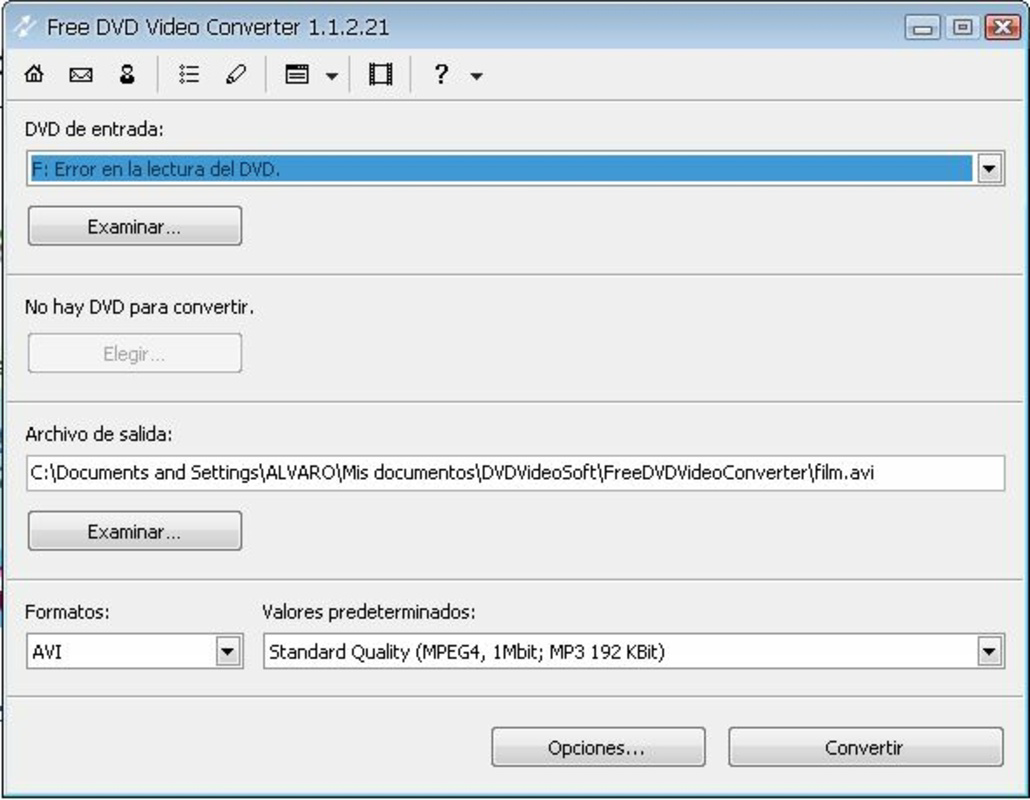
- Simple Conversion Workflow: The interface is designed for ease of use, requiring only three steps: selecting the DVD drive, choosing a destination folder, and setting the desired codec. This streamlined process reduces the learning curve and supports users of all technical skill levels.
- Adjustable Output Parameters: Advanced users can fine-tune various video parameters, including resolution, frame rate, and bitrate, to meet specific requirements. This level of control enhances the app’s utility for those seeking precise output customization.
For example, a user wanting to watch a DVD on their iPhone can select the iPod preset, which automatically configures the optimal settings for iOS playback. Similarly, someone preparing a video for a PS3 can use the PS3 profile to ensure compatibility and performance. These use cases demonstrate how the app simplifies complex technical processes into intuitive actions.
Interface, UX & Performance
The user interface of Free DVD Video Converter is designed with simplicity and functionality in mind. It features a clean layout with clearly labeled buttons and straightforward navigation, allowing users to complete the conversion process with minimal effort. The visual style emphasizes usability over aesthetics, prioritizing clarity and accessibility.
Navigation follows a linear flow: selecting the source DVD, choosing an output location, and configuring settings before initiating the conversion. This logical progression supports intuitive user experience, especially for individuals unfamiliar with media conversion tools. The app maintains consistent responsiveness during operation, although the developer did not list formal performance metrics or device-specific benchmarks.
Although the developer did not specify minimum OS requirements or compatibility details, the app’s lightweight size of 15.2 MB suggests it is optimized for efficient operation on a range of Android devices. Performance may vary depending on the device’s processing power and available storage, but the app’s design implies stable operation during standard conversion tasks. Users can expect reliable execution without frequent crashes or freezes, based on the app’s focused functionality and minimal system resource demands.
Platform Compatibility & Technical Requirements
Free DVD Video Converter is available on the Android platform, making it accessible to a wide audience of mobile users. The current version is listed as 1.0, with a file size of 15.2 MB. This compact footprint indicates efficient code implementation and minimal storage impact.
The developer did not specify minimum OS requirements or compatibility details for specific Android versions. As such, users should exercise caution when installing on older or less common Android devices. Similarly, no information was provided regarding hardware requirements, such as CPU or GPU specifications, or whether the app supports external DVD drives via USB.
Given the app’s purpose of reading physical DVDs, its functionality may depend on the device’s ability to access optical drives, which is rare on modern smartphones. This limitation suggests the app may require external hardware or be intended for tablet devices with compatible peripherals. Compatibility information was not fully disclosed, so users are advised to verify device support before installation.
Pros and Cons
- Supports conversion to widely used formats like AVI and MP4
- Offers device-specific presets for optimal playback
- Intuitive interface suitable for beginners
- Customizable quality and output settings
- Lightweight file size of 15.2 MB
- Developer did not provide detailed compatibility or system requirements
- App may require external DVD drive hardware for functionality
- No information on update frequency or future development
- Platform availability limited to Android only
- Missing technical details on performance or error handling
FAQ
Is Free DVD Video Converter safe to download and install?
Yes, the app is free and available for download. As with any third-party utility, users should ensure they are downloading from a trusted source to maintain device security.
Can I use this app on iOS devices?
The app is currently available only on Android. There is no official version for iOS at this time.
What devices can I convert DVDs for?
The app supports output for iPods, PSPs, Blackberries, Apple TVs, PS3s, and Xbox systems through optimized preset profiles.
Do I need a DVD drive to use this app?
Yes, the app requires access to a DVD drive. Most smartphones do not have built-in drives, so an external USB DVD drive may be necessary.
How often is the app updated?
The developer did not provide information on update frequency or maintenance schedule.
Final Thoughts
Free DVD Video Converter offers a practical solution for users looking to digitize their DVD collections and play them on modern devices. Its focus on compatibility, simplicity, and customizable output makes it a useful tool for both casual users and those with more technical needs. While some aspects such as system requirements and future updates remain unclear, the app delivers on its core promise with a lightweight, functional design.
It is particularly beneficial for Android users who own external DVD drives and want a straightforward way to convert video content. The ability to tailor output for specific devices enhances usability, while the minimal file size ensures easy installation and storage.
For those seeking a reliable, free tool to convert DVDs to MP4 or AVI formats, Free DVD Video Converter presents a compelling option. Download Free DVD Video Converter now
Guides & Tutorials for Free DVD Video Converter
How to install Free DVD Video Converter
- Click the Preview / Download button above.
- Once redirected, accept the terms and click Install.
- Wait for the Free DVD Video Converter download to finish on your device.
How to use Free DVD Video Converter
This software is primarily used for its core features described above. Open the app after installation to explore its capabilities.
User Reviews for Free DVD Video Converter 0
No reviews found


